I’ll be honest: In my last post about Pi-hole + Tailscale, I just simpley explained how to setup PI-hole with tailscale. Which works, amazing !! But, since I did not want the blog to be super long, I left out the nitty gritty details. This blog is like a second part to the first one, where I will explain the details of how everything works, some left out details and some of the concepts that I did not explain in the first blog post.
In this blog I will be covering things like:
-
DNS servers
-
Resolvers
-
Stub Revolvers
-
Recursive Resolvers
-
-
root servers
-
TLD servers
-
Authoritative Name Servers
-
-
“is Pi-hole a DNS server or not?”
-
“who decides what a URL query like
example.comresolves to?” -
“what does it mean when DNS ‘caches’ something?”
-
Finally, what is Unbound and how does it fit into all of this?
Buckle up, this is gonna be a long read 😅 With some context and disclaimer out of the way, let’s get reading ! 📖
How the flow of DNS resolution works (the basics)
If you already know about DNS basics, feel free to skip this section.
-
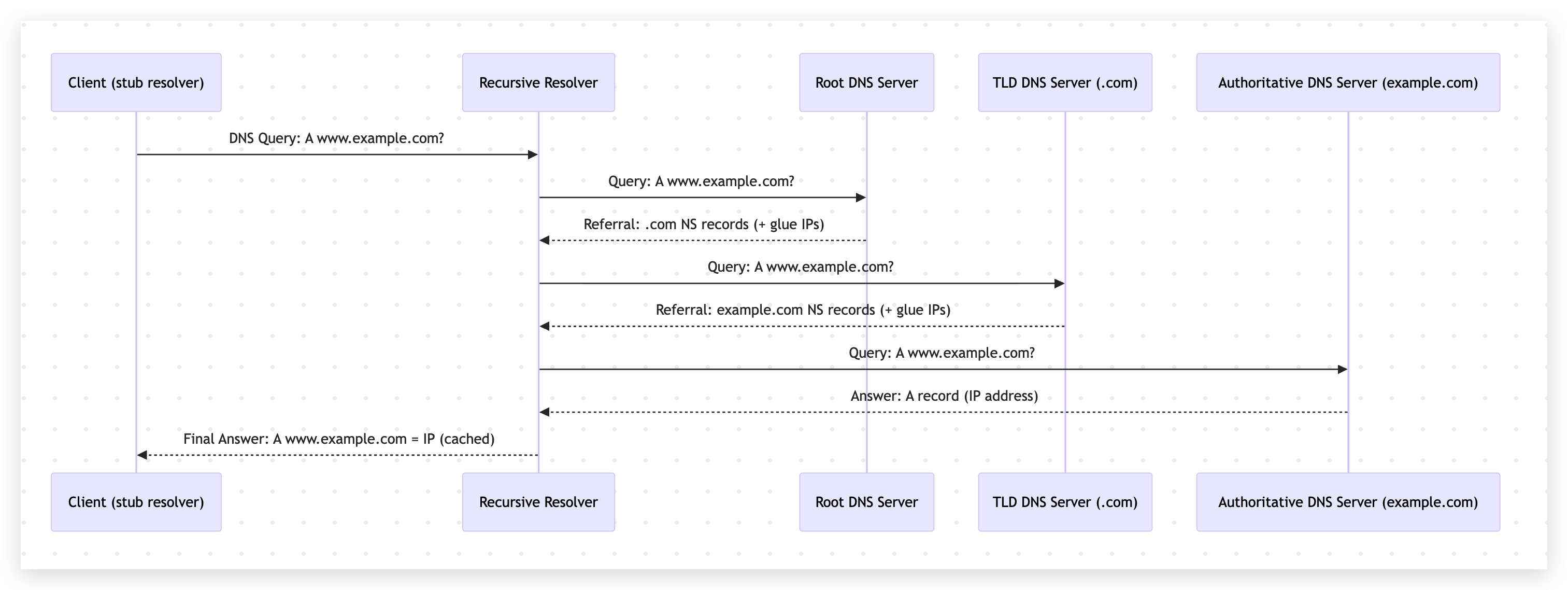
Your device asks a resolver: “what is the IP for
www.example.com?”. -
If the resolver has the answer cached, it replies immediately with the IP.
-
If not, it has to discover the answer by walking this DNS hierarchy:
-
Ask a root server: “who handles
.com?” -
Ask a TLD server: “who handles
example.com?” -
Ask an authoritative server: “what is the record for
www.example.com?”
-
-
The resolver caches the answer (for a while) and returns it to your device.
That’s the whole story. With the IP you get from this your device can then connect to the web server hosting www.example.com. Here’s a quick diagram to visualize this:
Now let’s break down the main players a bit more clearly.
DNS Server
Resolvers
Stub resolver
A stub resolver is the small DNS client on your device (phone, laptop, browser/OS stack).
Its job is simple:
-
Take your query (for example,
www.example.com) -
Send it to a configured DNS resolver
-
Return the response to the app
It usually does not walk the whole DNS tree by itself.
Recursive resolver
A recursive resolver is the one that does the heavy lifting. When you hear someone mention “resolver” in the context of DNS, they are usually referring to a recursive resolver.
already has the answer cached, it responds immediately.
If not, it performs the full lookup process:
-
Root server
-
TLD server
-
Authoritative name server
Then it caches the answer and sends it back to your device. You can see the recursive resolver in the diagram above.
Root servers
Root servers are the starting point of public DNS.
They do not usually know the final IP for www.example.com.
What they do know is: who is responsible for each top-level domain (.com, .org, .net, etc.).
So when asked about www.example.com, the root points the resolver to the .com TLD servers.
TLD servers
TLD (Top Level Domain) servers manage domains under a specific TLD.
For example, .com TLD servers do not know every record for every .com domain, but they know which authoritative name servers are responsible for example.com.
So they return something like: “ask these name servers next.”
Authoritative name servers
Authoritative name servers are the final source of truth for a domain’s DNS records.
This is where records like A, AAAA, CNAME, MX, TXT, etc. are stored.
When the recursive resolver asks for www.example.com, the authoritative server provides the actual answer and a TTL value.
Is Pi-hole a DNS server or not?
Short answer: yes.
But more specifically, Pi-hole is usually a filtering forwarder (a DNS sinkhole), not a full recursive resolver by default.
In practice, Pi-hole does three important things:
-
Receives DNS queries from your devices
-
Blocks known ad/tracker domains based on blocklists
-
Forwards allowed queries to an upstream resolver
So yes, Pi-hole is acting as your DNS server from the client point of view.
However, unless you pair it with something like Unbound, Pi-hole is typically forwarding those queries to another DNS provider (Cloudflare, Google, Quad9, etc.) for final resolution.
DNS caching
DNS caching means: “save the answer for some time so we do not have to ask again immediately.”
The authoritative server includes a TTL (time to live) with each DNS answer.
Resolvers cache that answer for TTL seconds.
If another request for the same name arrives before TTL expires, resolver returns the cached answer.
This improves speed and reduces load, but it also means DNS changes are not visible everywhere instantly.
Caching can happen at multiple layers:
-
Browser cache
-
OS cache
-
Local resolver cache (Pi-hole / router / enterprise DNS)
-
Upstream recursive resolver cache
Also, negative results can be cached too (for example, “domain does not exist”), which is called negative caching.
Finally: Unbound and where does it fit?
Unbound is a lightweight, validating, recursive DNS resolver.
If you run Pi-hole + Unbound together, the flow usually looks like this:
-
Device asks Pi-hole
-
Pi-hole blocks or allows query
-
If allowed, Pi-hole forwards to local Unbound
-
Unbound recursively resolves via root -> TLD -> authoritative
-
Unbound returns answer to Pi-hole, Pi-hole returns answer to device
That setup gives you a few nice benefits:
-
More privacy: fewer third-party public resolvers in the middle
-
More control: your own recursive resolution path
-
Local caching: faster repeat lookups
-
DNSSEC validation support (when configured), which improves trust in responses
In other words, Pi-hole handles filtering and visibility, while Unbound handles recursive DNS work. They complement each other really well.
Putting it all together with the previous post
In the previous blog, we routed selected devices through Pi-hole using Tailscale.
Now, with this deeper DNS view, that setup should make much more sense:
-
Tailscale decides which devices use your private DNS path
-
Pi-hole decides which domains are blocked
-
Unbound decides how allowed domains are resolved (recursively)
This separation keeps things clean and easy to reason about.
Final thoughts
If you made it this far, you now understand the most important DNS pieces people usually skip: stub resolvers, recursive resolvers, root/TLD/authoritative hierarchy, caching, and where Pi-hole and Unbound fit in.
Once these concepts click, DNS stops feeling “magical” and starts feeling predictable.
And that is exactly what you want when this is powering your home network.
Feel free to reach out if you have any questions or want to discuss further! I hope this was helpful in demystifying DNS and how Pi-hole + Unbound work together.